Everyday accounts connected to the work behind them
Manage customers and suppliers, sales, purchases, banking, nominal accounts and reports in the same self-hosted application as projects, time and customer relationships.
YouDoAccounting follows the records from the first commercial contact through operational work and into the accounts. That shared structure reduces duplicate setup and gives financial entries useful business context.
Three connected accounting journeys
Sales and purchases
Move through estimates, orders, invoices, credits and payments while keeping customer, supplier and document details together.
Banking and cashbook
Import CSV bank statements, use rules for routine entries and record cash receipts or payments that do not begin with an invoice.
Ledger and reporting
Organise nominal accounts into reporting groups and retain the account structure needed for management reports and the supported MTD workflow.
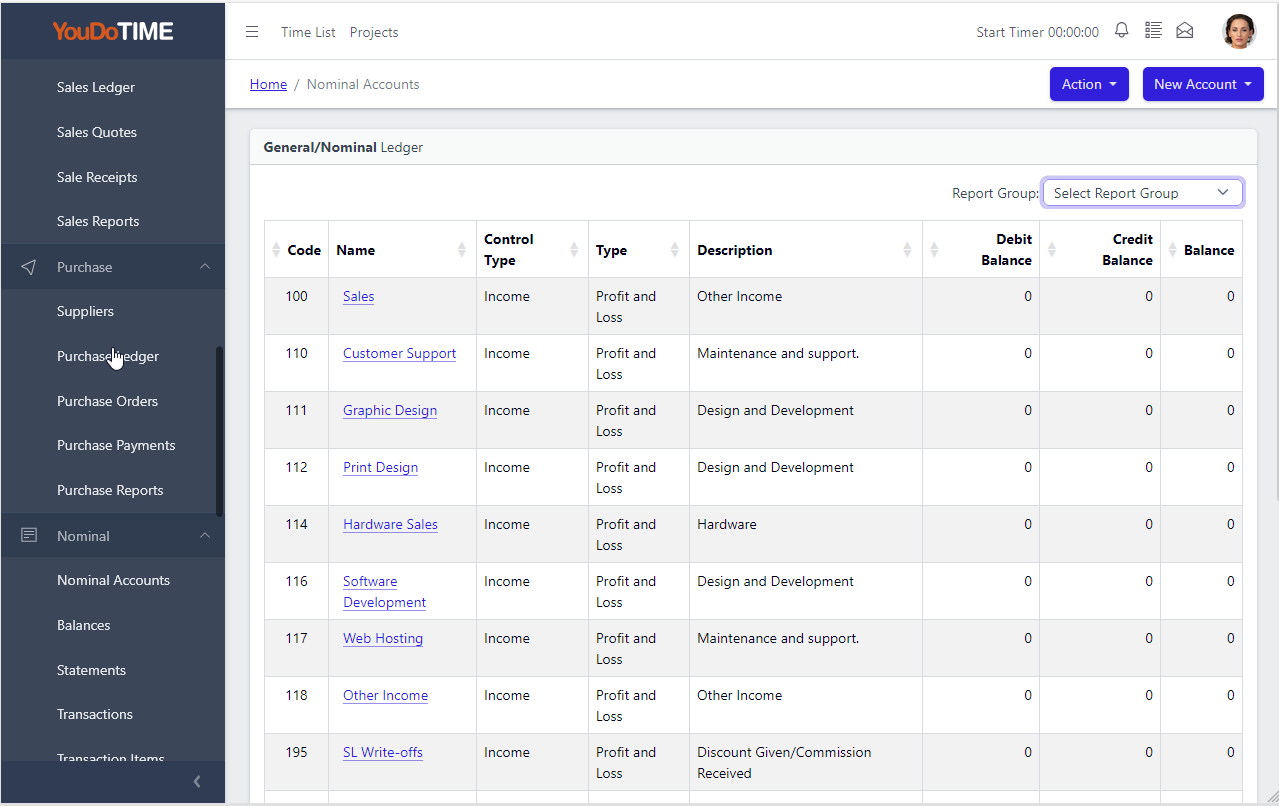
More than a numbered chart of accounts
See the reporting structure before you run the report
Each nominal account keeps its own accounting category and debit or credit behaviour, while its position in the financial statements is controlled separately through Report Groups.
Create a report header, add the child groups beneath it and assign each account from the ledger. Several detailed prepayment accounts, for example, can remain separate for bookkeeping while contributing to one Prepayments line on the Balance Sheet.
The result is an explicit reporting hierarchy—not one inferred only from nominal-code ranges or rebuilt in a separate report layout.
- Change report presentation without changing account behaviour.
- Keep detailed accounts behind clear financial-statement headings.
- See account classification and reporting position in the same ledger record.
The accounting workflow
From trading records to financial review
Each area has a detailed page for its screens and day-to-day workflow; this overview shows how the main records fit together.

Sales and invoicing
Create estimates, sales orders, invoices, credits, receipts and statements. Customer transactions remain available as a connected history rather than isolated documents.
Sales features
Purchases and expenses
Record supplier invoices, credits and payments, then handle project expenses and disbursements with their supporting business context.
Purchase features
Banking and cashbook
Import bank statements from CSV, apply bank rules to recurring transactions and enter cashbook sales or purchases directly when no invoice is involved.
Banking features
Reports and tax records
Review financial information through structured reports and use the dedicated Making Tax Digital area for the currently supported filing workflow.
Reporting features
Customers and suppliers
Maintain contact and trading information for the people and organisations behind sales and purchase records, without repeatedly setting them up elsewhere.
Contact features
Products and services
Keep reusable product, service and expense items ready for transactions, with the pricing and accounting details needed by the wider workflow.
Product features
Purchase orders
Record intended purchases before the supplier invoice and keep the ordering stage close to suppliers and purchase transactions.

Expenses and disbursements
Identify project-related purchases and cash expenses that need to be recharged to a customer.
Expense features
Accounting budgets
Set period budgets against nominal accounts and compare them with actual ledger movement and variance.
Making Tax Digital
Review the supported VAT submission workflow and the current status of Income Tax functionality.
MTD features and statusWhere YouDoAccounting differs
Accounts are part of one operational record
The accounting area does not sit behind a separate customer list. It uses the same application records as CRM activity, project delivery and time recording, preserving the route between commercial work and its financial result.
The application is self-hosted and supports multiple companies, financial years, departments and report groups. Generated sales and purchase PDFs can remain with the transaction record for later review.
Shared business relationships
Customers, suppliers, projects and time records provide context for the accounting entries created from the same business activity.
A practical transaction trail
Move from a contact to its transactions and from a financial document to the related payments, nominal entries and archived output.
Local control over financial data
Run the accounts from the same self-hosted YouDoSoftware installation instead of moving operational records into a separate cloud accounting database.
Follow the accounting workflow
Start with customers and suppliers, then move through transactions, banking, the nominal ledger and reports.