Time tracking integrated with projects and accounting
Allocate budget hours, record the actual time spent on project and CRM work, review weekly timesheets and turn billable work into a YouDoAccounting sales invoice.
YouDoTime is the time-management area of YouDoSoftware. It connects working time with YouDoProjects, customer records, CRM pipeline activity and YouDoAccounting. Run it on your own Windows PC or Mac and use it through a browser.

Timer or manual entry
Start a timer as work begins, or record start and finish times afterwards when completing the entry from notes.

Work allocation
Record time against a customer, project task or CRM pipeline task so managers can see what the hours were used for.

Budget and actual hours
Use the allocated task budget as the plan, then compare it with the actual time recorded while the work is completed.

Timesheets to invoices
Review billable hours in a weekly timesheet and create a draft sales invoice directly in YouDoAccounting.
Actual time in project context
See where the hours went and which task they completed
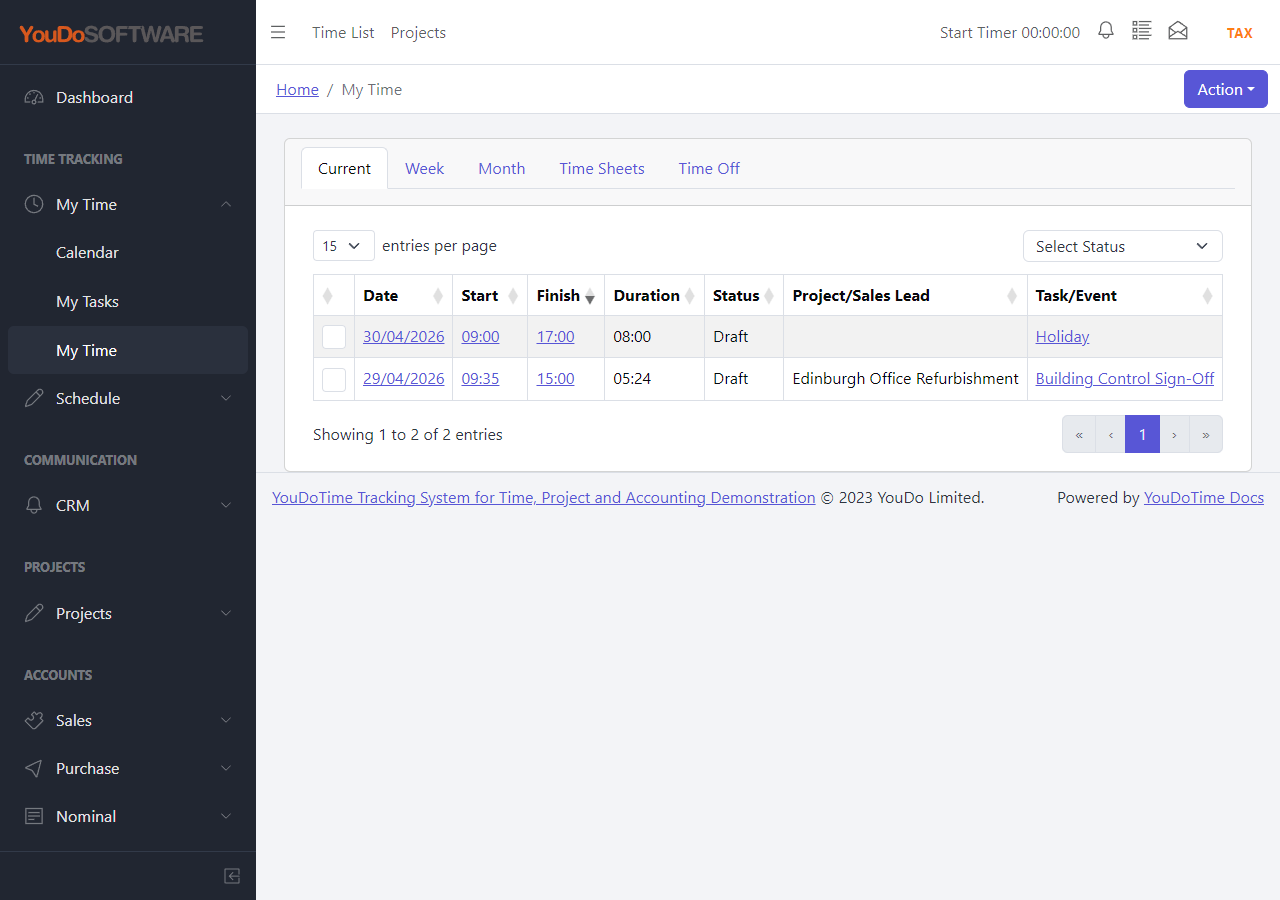
The My Time list shows each entry’s date, start and finish times, duration and status. Its project and task columns identify the work behind the hours rather than leaving managers to reconcile an unstructured description later.
That context begins when the entry is created. The user can choose the relevant customer and either project work or CRM pipeline activity, then record whether the time is billable and which rate or service provides its value.
- Start a timer or enter the time after the work is finished.
- Keep the actual hours attached to the YouDoProjects task.
- Carry billable time forward into weekly review and invoicing.
The YouDoTime workflow
One integrated route from planned work to billed work
Each area has its own working screen, but the project, task, time and accounting connections continue through the complete workflow.
Track time
Capture the duration and description of the work, identify who performed it and allocate the time to the customer, project task or CRM activity that explains why it was done.
Time tracking featuresPlan team schedules
Allocate budget hours to project tasks, plan who will do the work and compare the budget with actual time as the job progresses.
Scheduling featuresPrepare timesheets
Group detailed entries into weekly records, use approval where required and turn billable time into a YouDoAccounting draft sales invoice.
Timesheet features
Manage time off
Record absence periods for individual users and display them alongside working time, tasks and schedules when the team reviews availability.
Time-off featuresIntegrated project time
A practical example from task budget to customer invoice
A consultancy creates a customer project in YouDoProjects and allocates twelve budget hours to a task. The assigned user records five hours on Tuesday and seven on Wednesday. YouDoTime now shows twelve actual hours against the twelve-hour budget.
Those entries are collected into the user’s weekly timesheet. Once the billable hours are ready, YouDoTime can create a draft sales invoice in YouDoAccounting for the same customer, retaining the project connection where the selected work belongs to one project.
Allocate the budget
Set the expected hours on the YouDoProjects task and schedule the person and dates responsible for the work.
Record the actual time
Use the timer or manual entry and select the customer, project, sub-project and task so the hours update the right job.
Review and invoice
Prepare the weekly timesheet, approve it when that workflow is enabled, and create the customer’s draft invoice from billable time.
Follow the complete YouDoTime workflow
Start with an individual time entry, then see how weekly review and accounting integration complete the process.