Sales Pipeline
 One Record, Full Context
Every sales lead carries its company, contact, stage, status, priority, budget, value, events, tasks and documents in a single record.
 Opportunities and Sales Leads
Track unqualified opportunities separately from qualified sales leads. The pipeline shows both; the stages tell you where each one is.
 Unlimited Users, Fixed Cost
Give the whole sales team access without per-seat fees. Self-hosted on your own server — no subscription, no caps.
 Integrated With Everything
Won the sale? The customer record transitions straight to accounting. No re-keying, no export, no import.
Sales Pipeline
From opportunity to customer.
An opportunity is potential — something that might happen. Once qualified, it becomes a sales lead: actively being worked, with a stage, a value and an owner. The contact behind it is a prospect until they buy, at which point they become a customer.
YouDoCRM keeps CRM records independent from your accounting ledger, so prospects never pollute your customer accounts. When a sales lead is won, the customer transitions automatically — no re-keying, no exports, no import step.
Sales leads can come from either new prospects or existing customers. Every lead is issued to a user and a team, with events for future contact and tasks for the actions needed to progress it.
Download free edition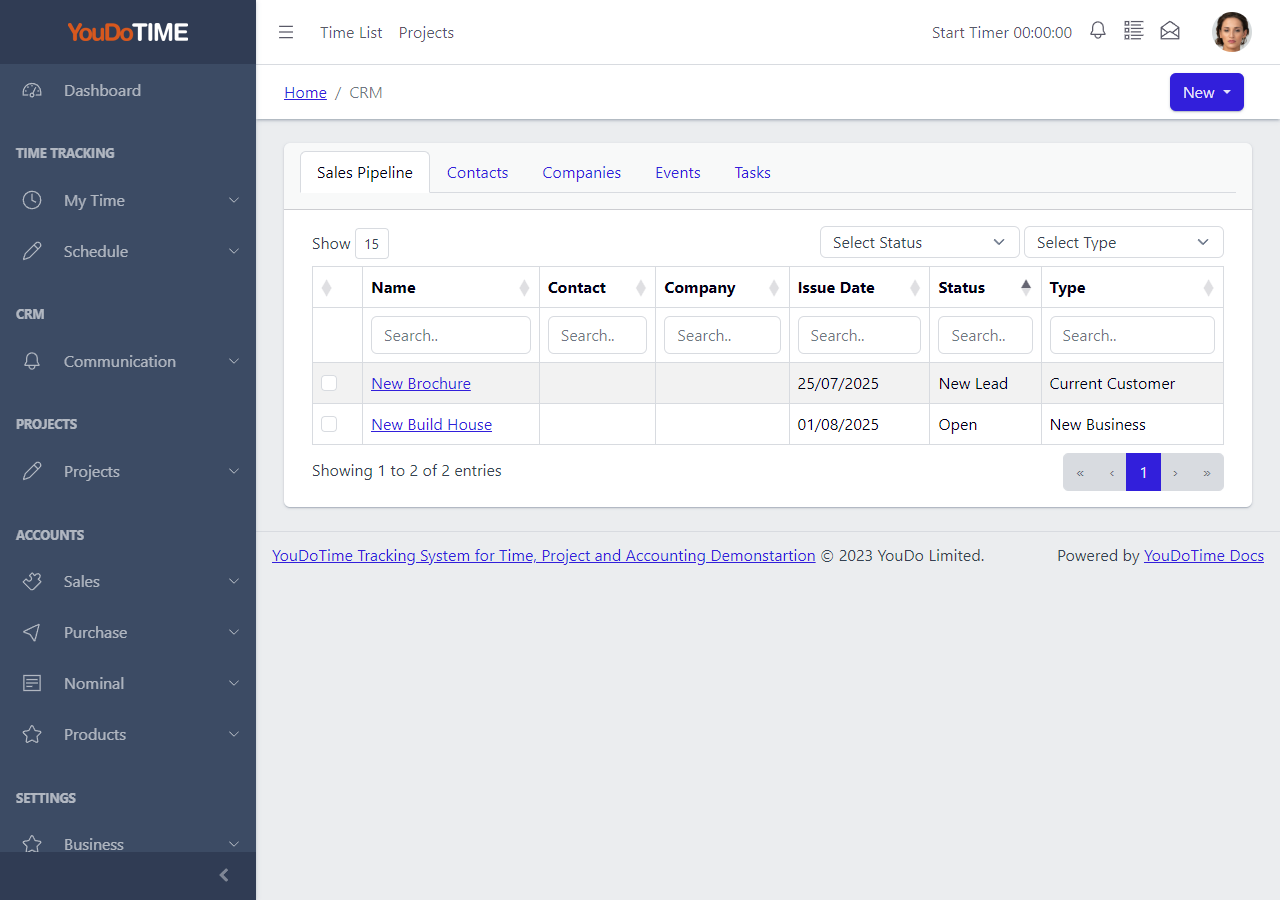
All your sales leads, one screen.
The pipeline list shows every opportunity and every sales lead together. Filter by stage, status, priority, owner, team or company and the list redraws instantly. Find out which leads are stuck in qualification, which are approaching their next-contact date and which are waiting on a task.
Most small-business CRMs charge per user and hide multi-pipeline views behind paid tiers. YouDoCRM gives the whole team access by default — your office manager, your sales reps and any user you add to the system can open the pipeline and filter it to whatever they own.
- Opportunities and sales leads in one list.
- Filter by stage, owner, team or company.
- Unlimited users at no extra cost.
- Click straight into the lead detail.
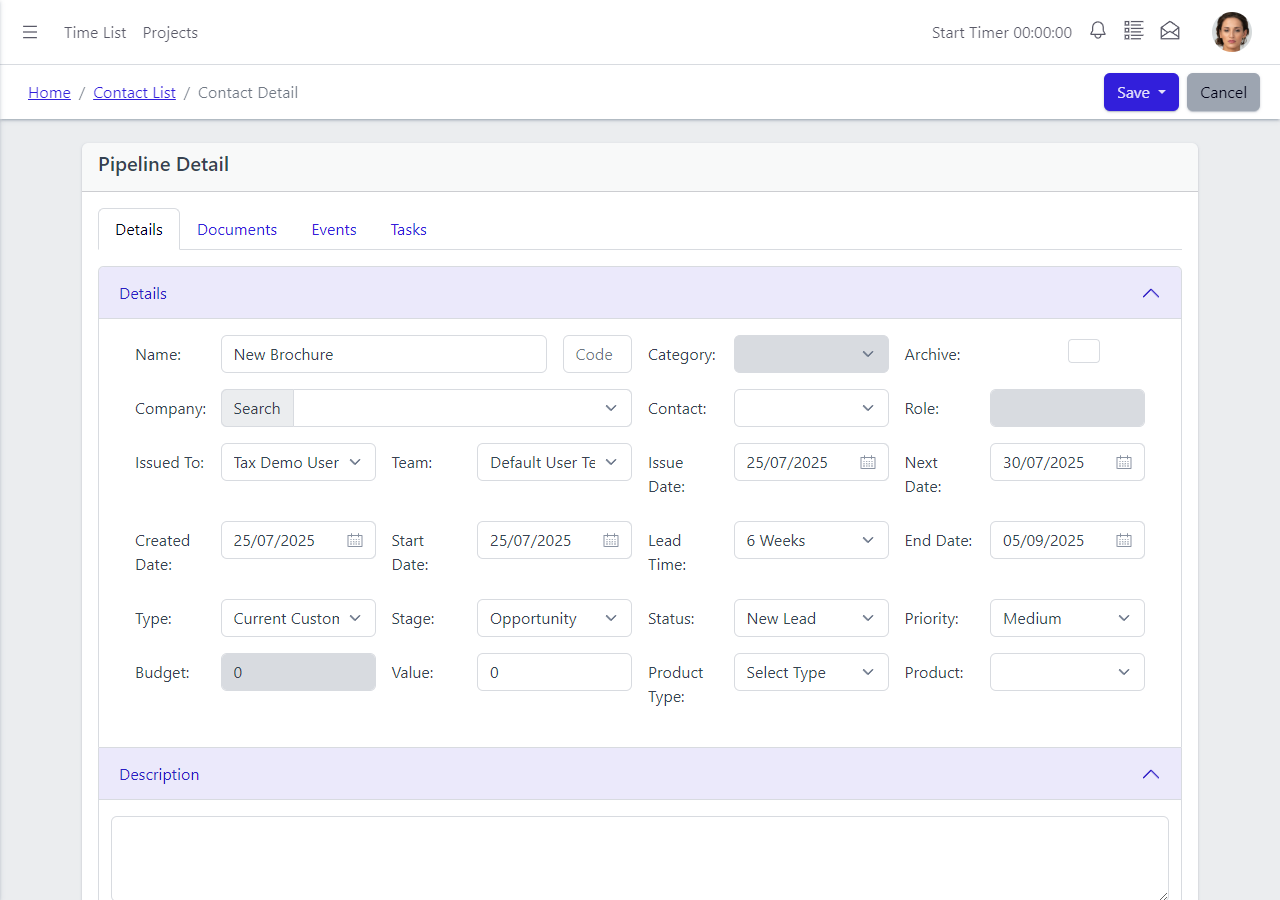
Everything about a lead in one place.
The sales lead detail holds every field you need to qualify, progress and close the lead. Stage, status, type and priority sit alongside the budget and value. Product type and product let you tag what the lead is actually for. Issue date, next-contact date, start date, lead time and end date frame the timeline.
Every lead is issued to a named user and a team, so accountability is clear. A linked company and contact tie the lead back to the wider CRM record — and the Events, Tasks and Documents tabs live on the same screen, so you never lose context switching between views.
- Stage, status, priority, budget and value in one view.
- Issued to a named user and team.
- Events, tasks and documents on the same page.
- Linked company, contact and product.
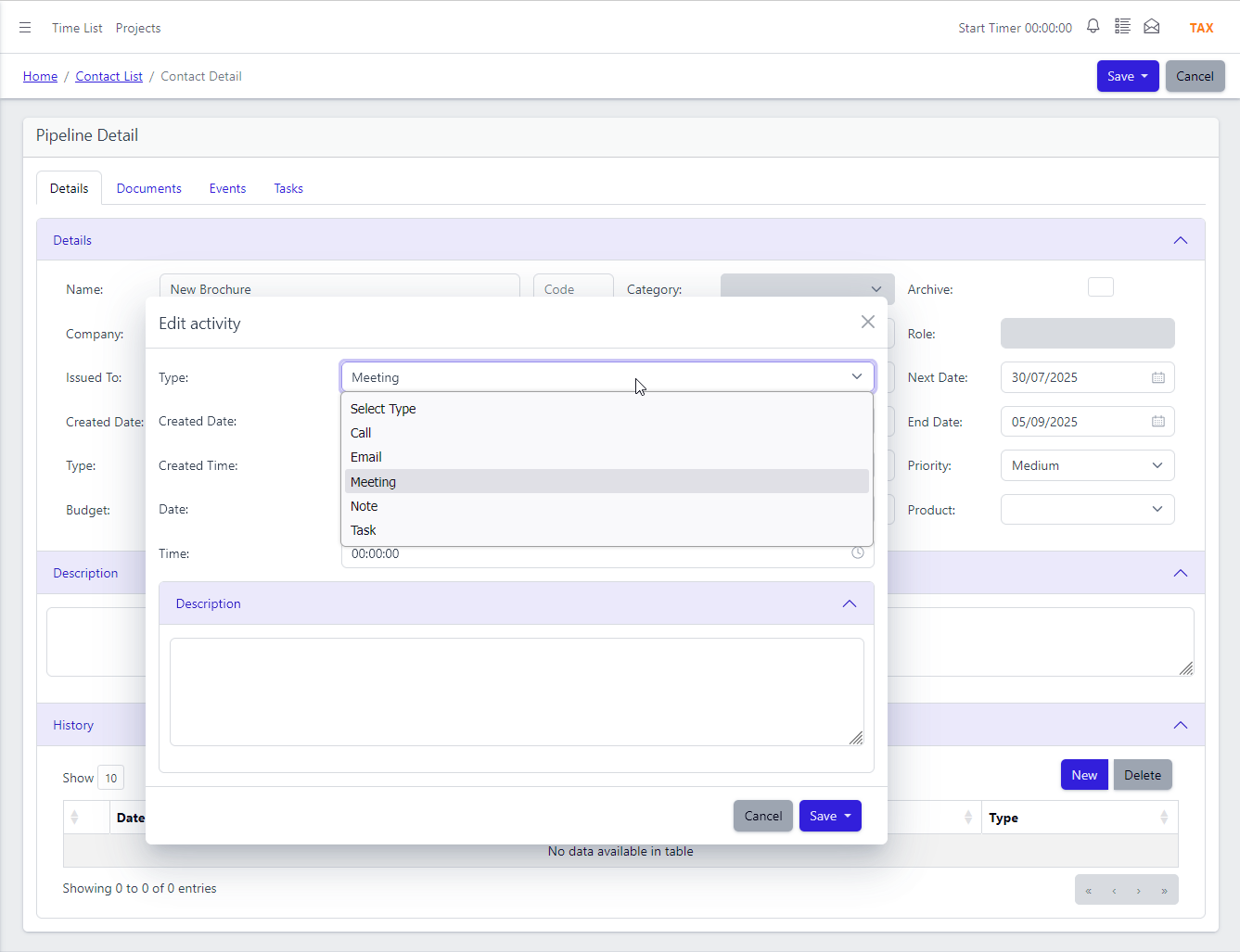
Contact history from one quick modal.
Record every interaction with a prospect or customer — a phone call, an email, a meeting, an event — from a single pop-up on the sales lead. Choose the type, add the notes, set the date and save. The entry joins the lead's contact history in timeline order.
No switching between separate screens for different activity types. No separate "log a call" workflow versus "record an email" workflow. One modal, every activity type, one timeline. Any team member can pick up a lead and see at a glance what has already happened.
- Phone calls, emails, meetings and events in one modal.
- Timestamped timeline against the sales lead.
- Quick entry from any pipeline view.
- Full detail when you need it.
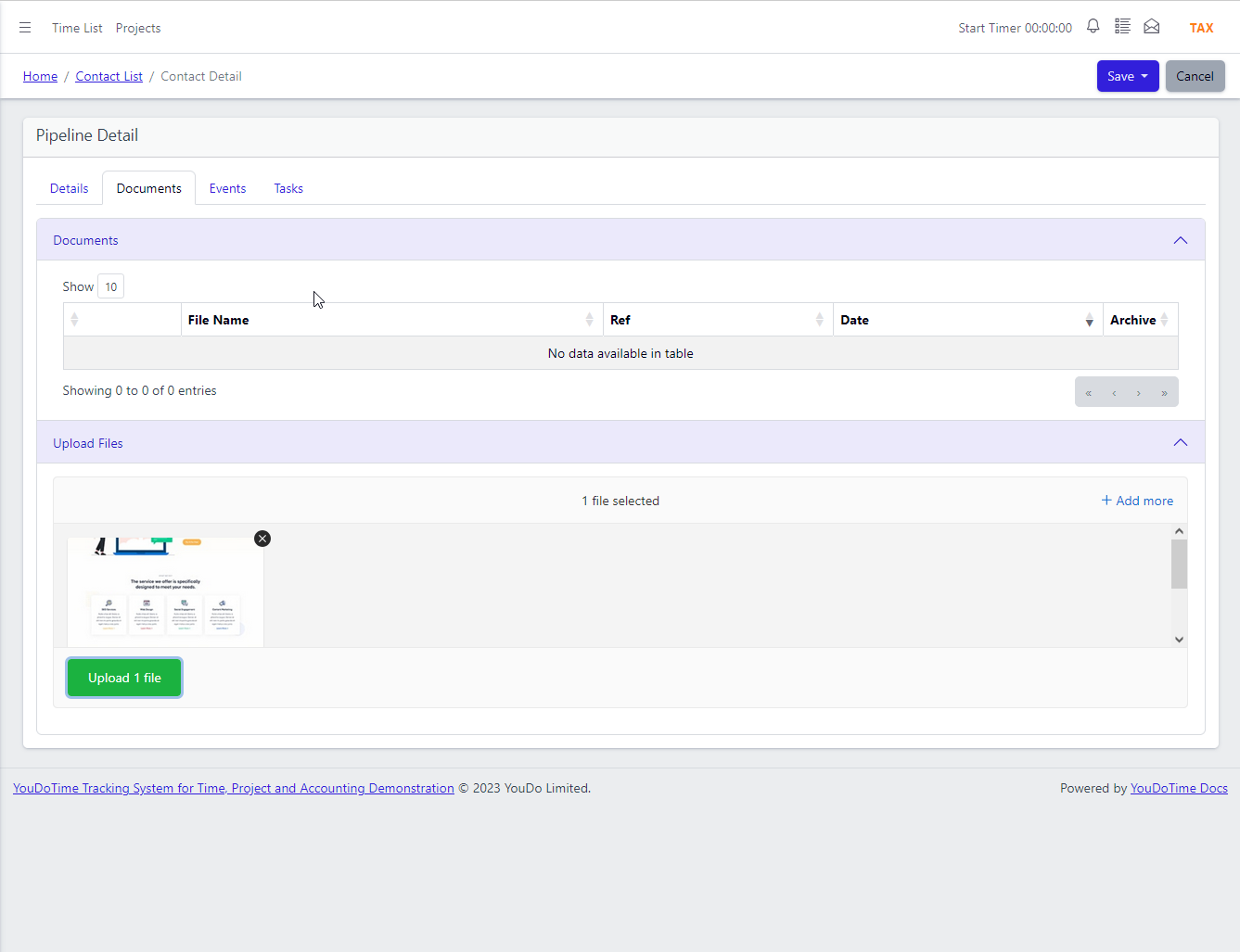
No limits on what you attach.
Attach quotes, proposals, contracts, photos, videos, CAD drawings, site plans — as many as you like, at any file size. Storage is your own hard disk, not a vendor-imposed quota. Cloud CRMs typically cap you at 20–250 MB per file, a few GB per user, or gate larger storage behind a higher tier.
Because YouDoCRM runs on your own server, the only limit is the disk space you allocate to it. Attach a 10 GB video to a sales lead if it helps you close the deal — no upgrade prompt, no subscription tier, no storage meter.
- Unlimited files per sales lead.
- No per-file size restriction.
- All documents stay on your own server.
- Search, tag and filter across attachments.
Frequently asked questions
Short answers to the questions we hear most often about the YouDoCRM sales pipeline.
An opportunity is potential — a possible sale that hasn't been qualified yet. A sales lead is a qualified opportunity: someone has had a conversation, the need is real and it's actively being worked. In YouDoCRM the same record moves from one state to the other as its stage progresses, so you don't have to re-enter anything.
Functionally yes — many cloud CRMs call these records "deals". We call them sales leads because strictly speaking a deal is something you've already agreed. If you are used to mainstream cloud CRM terminology, think of our opportunities and sales leads as the two stages of what those tools call a deal.
Yes. A sales lead can be raised against a prospect (someone who's never bought from you) or an existing customer (for a repeat or upsell). The contact record and the pipeline record are separate concepts, so customer status doesn't prevent you from opening a new sales lead for them.
The CRM holds its own prospect and contact records, independent from the accounting ledger — so prospects never pollute your customer accounts. When a sales lead is won, the prospect transitions automatically to a customer in the accounting system. No re-keying, no export, no import.
No. Every sales lead can hold as many documents as you like, at any file size. Because YouDoCRM runs on your own server, the only limit is the disk space you allocate to it. Cloud CRMs typically cap you at 20–250 MB per file, a few GB of total storage, or gate larger storage behind higher-priced tiers.
No. YouDoCRM is a one-off licence, installed on your own server, with unlimited users included. Add your whole sales team, your office manager and any staff who need visibility — no per-seat fees and no caps. Cloud CRMs typically charge £7–£25 per user per month and gate features behind higher tiers.