Time Tracking
Know where the working week goes
Time is valuable. Until it is measured and allocated, a manager cannot tell which customers, projects and sales opportunities are consuming it.
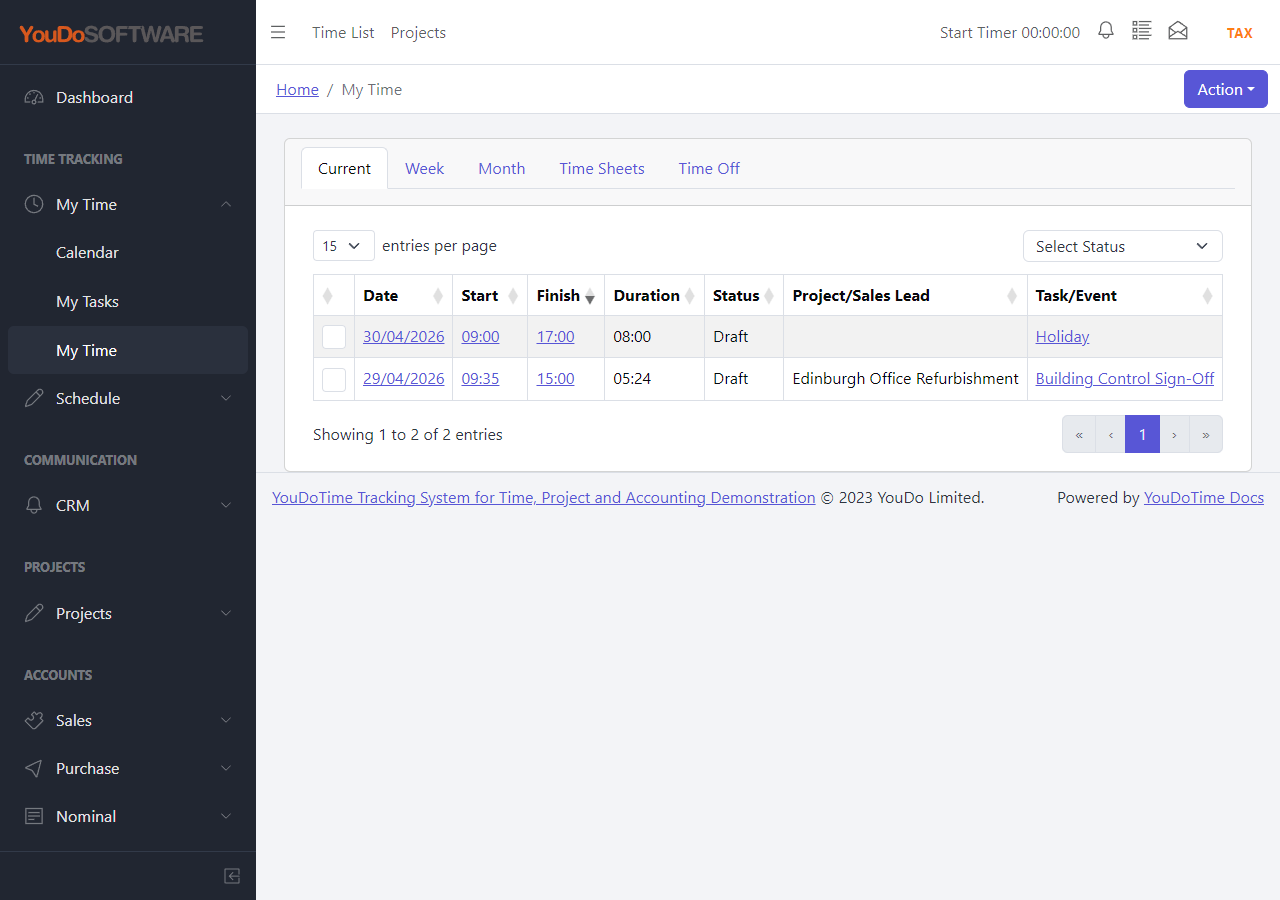
YouDoTime records who did the work, when they did it, how long it took and what the time was used for. Users can run a timer while they work or enter the time afterwards from their notes.
Four questions a time record should answer
Who?
Identify the user who carried out the work.
For what?
Allocate the entry to a customer, project task or CRM pipeline activity.
How long?
Keep the date, start, finish and calculated duration.
What value?
Record whether the time is billable and the service or rate used to value it.
Why track time?
Turn a busy week into information a manager can use
A full diary does not show whether the right work was completed. A time record adds the context needed to understand where effort went and whether it matched the priorities of the business.
Managers can review the hours by user and by job. They can see how much time was spent delivering project work, preparing a sales opportunity or completing other customer activity.
- Explain the hours with a clear description of the work.
- See which person spent time on each job or activity.
- Compare actual time with the hours allocated to the work.
- Separate billable work from internal or non-billable activity.
This is a temporary application example and may be replaced as the interface and demonstration data are updated.
Timer or manual entry
Record time in the way the work actually happens
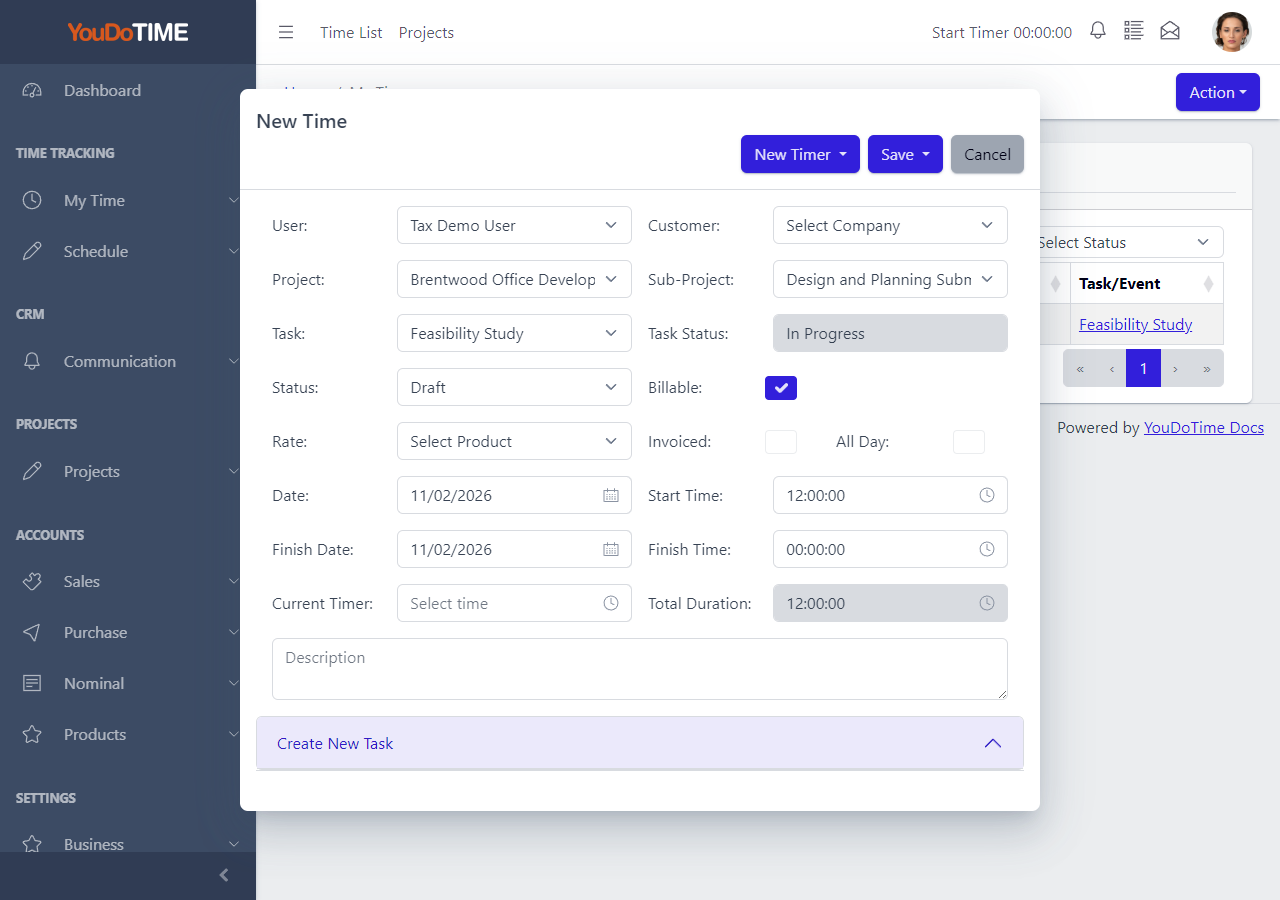
Start the timer when the work begins and stop it when the job is finished. If the work took place away from the computer, enter the start and finish times later. YouDoTime calculates the duration and keeps it with the date and description.
The entry also records the customer and work context. Billable status and the selected service or rate give the time a commercial meaning before it reaches a timesheet or invoice.
- Start and stop timer available from the application header.
- Manual start, finish and duration entry when a timer is not practical.
- Description, status, billable treatment and value retained with the entry.
Allocate time to the work
A job does not have to be a formal project
Project work can be recorded against the customer, project, sub-project and task. This allows the actual time to be compared with the hours allocated to the task budget.
Sales and customer work may begin before a project exists. YouDoTime can also associate time with a company, sales lead and CRM pipeline task, such as preparing a quotation, holding a meeting or following up an opportunity.
The advantage is a more complete view of the working week. Delivery and pre-sales activity can be measured without inventing a dummy project for every piece of work.
Time recorded against a CRM sales lead
Replace this panel with a populated application capture showing a time entry linked to a company, sales lead and pipeline task.
Suggested example: two hours preparing a revised quotation for an active sales opportunity.
Features, advantages and benefits
Use measured time to improve the next decision
The purpose is not to collect hours for their own sake. It is to understand the work, price it and plan it more accurately.

Budget against actual
Allocated hours are the budget. Recorded hours are the actual time taken. Comparing the two helps a manager improve estimates and identify work that is taking longer than expected.

Cost and bill the work
Billable status and value provide the information needed to turn completed customer work into a weekly review and, where appropriate, a sales invoice.

Understand productivity
Useful productivity information shows how available time was allocated. It does not require screenshots or automatic monitoring of every desktop action.
A working-day example
Seven hours, three different reasons
A user spends two hours preparing a quotation for a CRM sales lead, four hours completing a customer project task and one hour on non-billable internal administration.
Without allocation, the manager sees only seven hours. With YouDoTime, the same total explains the sales work, delivery work and overhead behind the day.
What the manager can now decide
- Whether project delivery is within its allocated hours.
- How much pre-sales effort the opportunity required.
- Which work should be included in the weekly timesheet.
- Whether future work needs a different budget or allocation.
Plan the hours or review the week
Continue to the schedule to allocate time before the work starts, or use timesheets to review the time after it has been recorded.