Timesheets
Turn individual entries into a weekly account of the work
A timesheet is a weekly summary of a user’s time and what they spent that time doing.
The total tells a manager how many hours were recorded. The supporting entries explain the dates, durations, customers, projects, tasks and billable treatment behind that total.
A useful timesheet needs more than a total
Person and week
Identify whose time is being reviewed and the period it covers.
Duration and detail
Retain each date, start, finish, duration and description.
Allocation
Show the customer, project and task responsible for the hours.
Review and billing
Keep status and billable treatment visible before the week is completed.
What is a timesheet?
A weekly summary with the evidence underneath
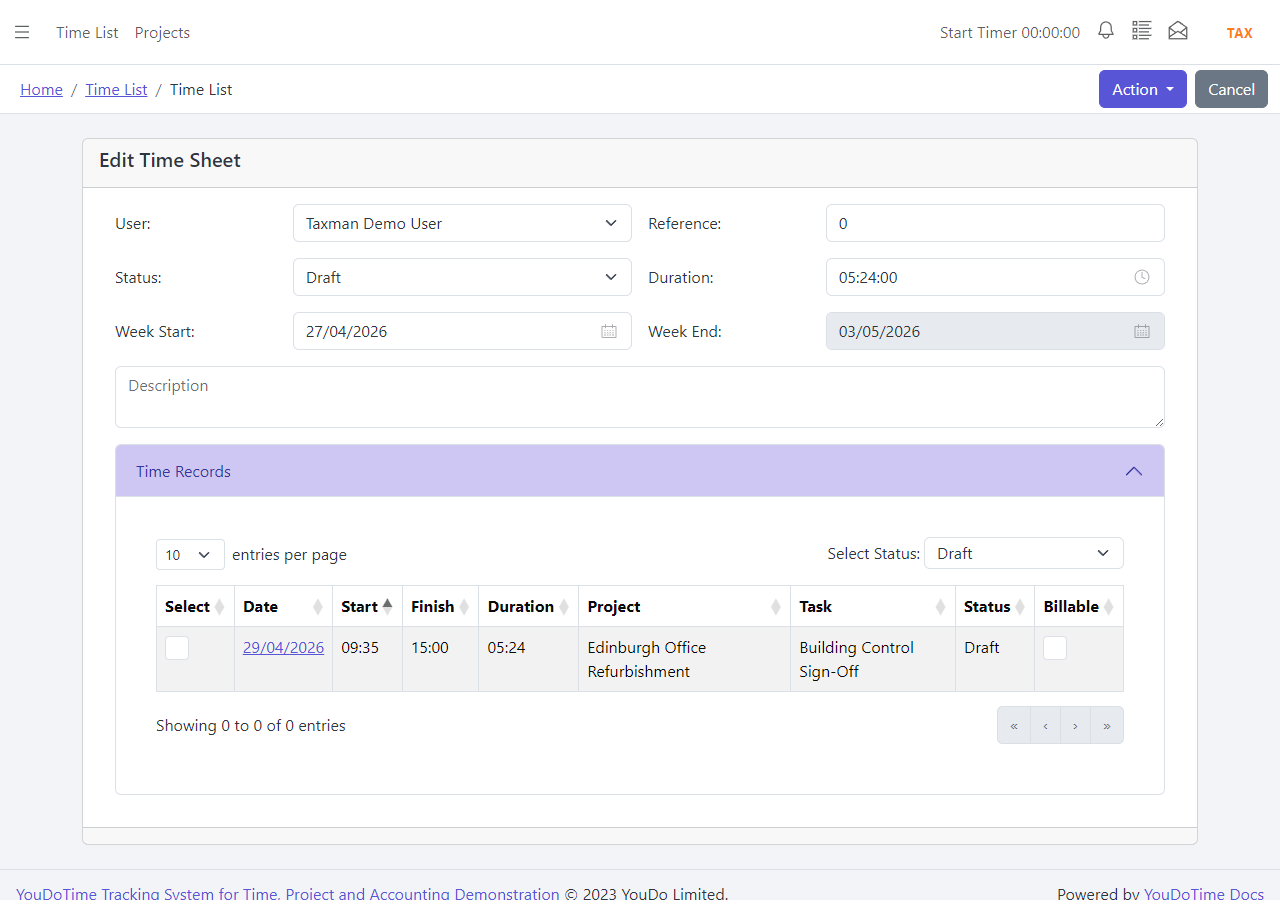
YouDoTime creates a parent record for the week and groups the user’s detailed time entries beneath it. The parent keeps the week’s start date, end date and total duration. The entries show how the total was built.
This is important because “thirty-seven hours” does not explain whether the time was spent on customer delivery, administration or work that should be billed. The detailed records provide the explanation.
- Weekly start and finish dates with total duration.
- Individual dates, times, durations and descriptions.
- Customer, project, sub-project and task allocation.
- Status and billable information retained for each entry.
This is a temporary application example and may be replaced as the interface and demonstration data are updated.
Why managers need timesheets
Check who spent what time on which job
A weekly review converts individual time recording into a consistent management record.
Is the week complete?
Check that expected working time has been recorded and that gaps or unusually long entries have an explanation.
Was it allocated correctly?
Review the customer, project, task and description so the hours are attached to the work that used them.
What happens next?
Confirm whether the time is billable, needs correction or is ready to move into the customer-invoice workflow.
Optional approval
Use a formal workflow when the business needs one
Not every organisation needs timesheet approval. YouDoTime controls the workflow through a business setting, allowing a smaller team to keep the process simple while another business can require a formal review.
When approval is enabled, the user submits the weekly timesheet. An authorised reviewer can approve or reject it. Rejection returns the record for correction instead of allowing unclear or incomplete time to move forward.
This provides an audit point before hours are treated as complete or used for billing.
From draft week to reviewed record
- Record and allocate the individual time entries.
- Check the week, descriptions and billable status.
- Submit the timesheet when approval is enabled.
- Approve it or reject it for correction.
- Complete the reviewed week and continue with billing where appropriate.
Example: twelve hours of customer work
- A project task has twelve budget hours allocated to it.
- The user records five hours on Tuesday and seven on Wednesday.
- The weekly timesheet shows twelve actual hours with the project task and descriptions underneath.
- The manager reviews and approves the week if approval is enabled.
- The billable entries create or update a draft YouDoAccounting sales invoice for the customer.
Allocate cost and billable value
Turn reviewed time into accounting information
A manager may need the same hours for two different purposes. The project needs the actual time so its budget can be reviewed. Accounting needs the billable time so the customer can be invoiced.
YouDoTime keeps the detailed entries behind the weekly total. Billable entries can create sales-invoice items for the same customer inside YouDoAccounting. If a suitable draft invoice already exists, the time can be added to it; otherwise the application creates a new draft invoice.
Where all selected time belongs to one project, the draft invoice can also retain that project relationship. The benefit is traceability from the invoice back to the work completed.
Explore YouDoAccounting invoicingBetter management information
Use the week to improve the next week
A timesheet is historical, but its value is forward-looking. Repeated overruns may show that a task budget is too low. Large amounts of unallocated time may show that descriptions or work categories need attention.
The aim is not simply to prove that people were busy. It is to understand whether working time was allocated to the activities that matter and whether future work should be planned differently.
Questions the weekly record can answer
- Which customers and jobs used the team’s time?
- Which project tasks exceeded their allocated hours?
- How much completed work is billable?
- Where should the next schedule or estimate change?
Start with accurate individual time
See how the underlying entries are recorded and allocated, or continue into YouDoAccounting for the customer-invoice workflow.